



 137
137
Background
Clients may need to be exited from the Family Coordinated Entry System (FCES) for a multitude of reasons such as the client being housed, no longer needing FCES services, or there has been no communication with the family. Exits are commonly occurring and the exits should be properly noted. To exit a family from FCES, follow the steps below.
Exiting a Household
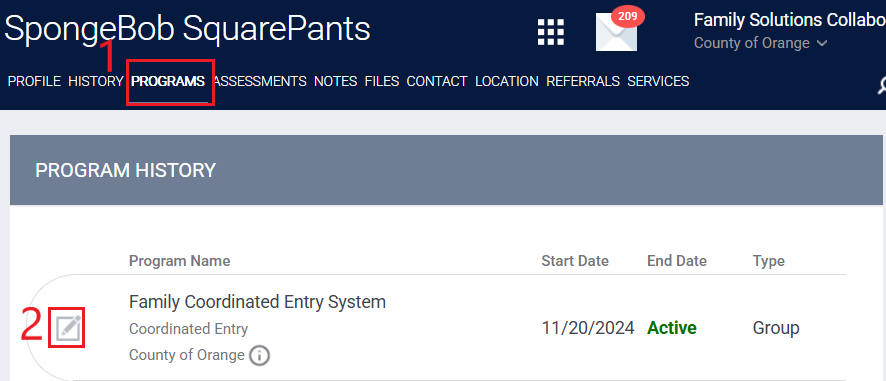
Step 1: Search for the client’s profile that you want to exit, go to the programs tab and select the edit icon that appears on the left of the active FCES enrollment.
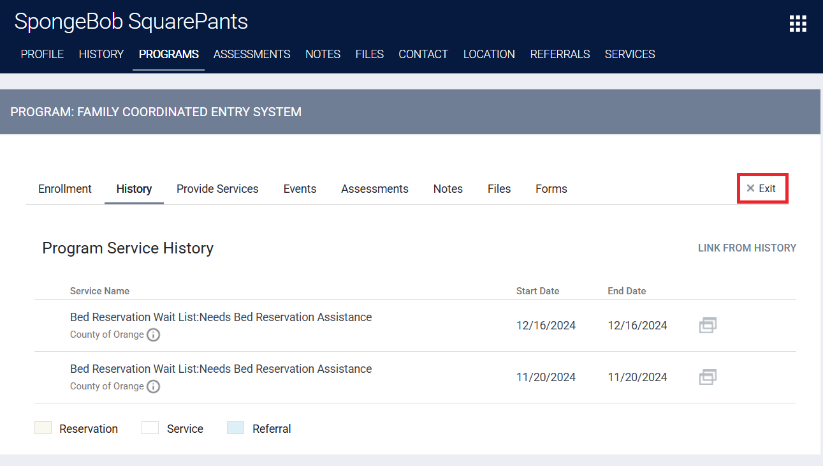
Step 2: Click on the exit button on the top right.
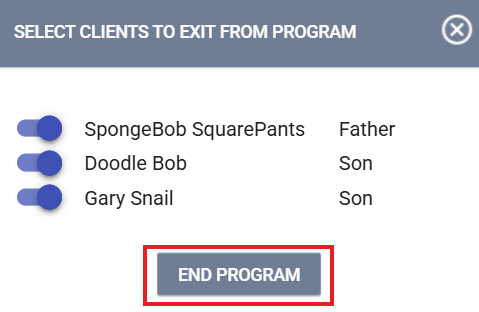
Step 3: A box will appear that will allow you to select other household members who will also exit from the program. Toggle next to the members that need to be exited and click on end program then the exit screens will appear for each household member. You will need to answer the exit screen questions including the project exit date and the destination.
Exit Date
The project exit date marks the end of the households participation in the FCES program. The exit date should be the date they were permanently housed, the last known contact date, or the day services were terminated.
Exit Destination
The exit destination should be their known location upon exit. The exit date is reflective of where they were exiting to not why they were being exited. Refrain from using “other, data not collected, client prefers not to answer, or client doesn’t know” as these are considered missing data and data quality errors. If the household is being exited due to no contact, the destination will reflect "No Exit Interview Completed."
Pending Referrals
If the client has pending referrals to the Community Queue or Bed Reservation Queue, the access point staff will need to remove them from the queues. The access point staff should review the Removing Households from the Community Queue knowledge base article for instructions on how to remove a client from the CQ.

